

Secure Remote Access


































If Your Team Needs Help, Distance Shouldn't Matter
The power of truly flexible remote support.
Your CFO is overseas and their laptop starts acting up. A field service technician is out on job sites all day and can’t stop for support. Retail POS workstations need regular updates, patches, and maintenance, but every minute of downtime means lost sales.
With Unattended Access you can:
- Service workstations remotely when the user isn’t present
- Resolve issues without accessing sensitive data
- Perform maintenance after hours with no lost revenue
- Support locked down workstations that can’t be touched during business hours
Secure Remote Access changes everything.
Three Core Remote Access & Management Features
Remote Support
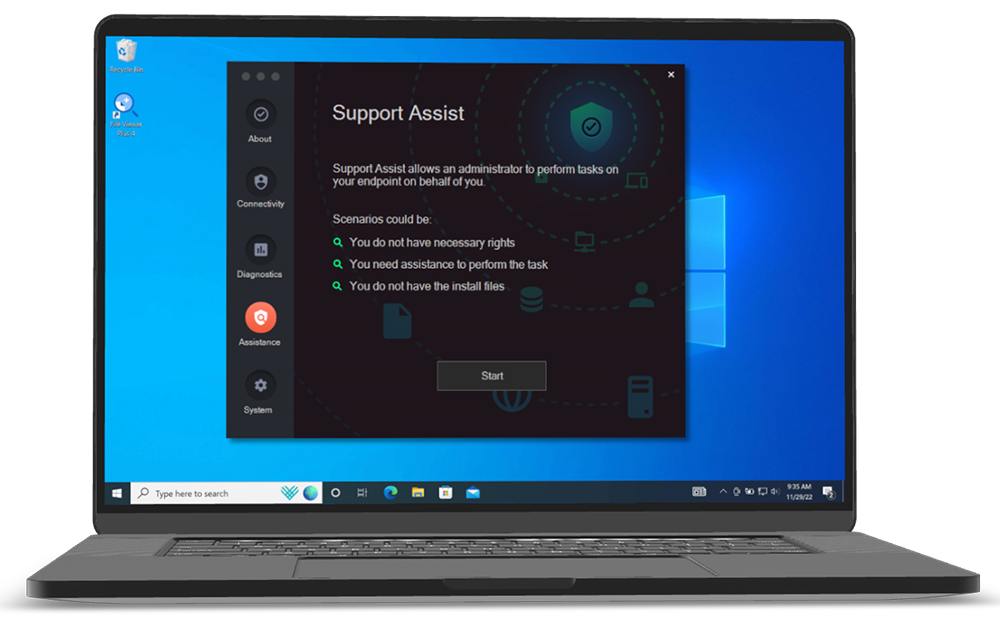
Screen sharing and remote control for IT support. Users can request help instantly, and IT can provide assistance without complex setup
User-initiated or admin-initiated sessions
Multi-monitor support with screen switching
View-only mode for sensitive devices
Automatic session recording
MFA protection for admin access
Unattended Access
Connect to servers and workstations without anyone present. Perfect for maintenance, monitoring, and after-hours administration.
Browser-based RDP, SSH, and VNC
Cloud or on-premise gateway options
Password-less authentication
Automatic device discovery
256-character rotating passwords
Vendor Access
Give external partners secure access to specific systems without VPN complexity or permanent credentials.
No software installation required
Scope-limited access controls
SSO integration for easy management
Complete session auditing
Time-limited access grants
The future of remote work
Leadership Insights
CEO & Director discuss the product, vision, impact, and more.
Secure Remote Access
1:52
2:01
1:38
2:04
2:02
0:59
The Complete Security Suite
Both Endpoint Privilege Management and Secure Remote Access come with these core Workstation Features. They work great on their own, but when combined, you get a powerful zero-trust security platform complete protection across your systems.
Auditlog
Track all privileged activity on servers
Inventory
Gather all details about devices in your network
Sub-settings
Create granular access controls
Auto-Approval
Allow auto-approval of requests for elevation
Endpoint MFA/SSO
Enforce business rules and compliance requirements
Integrations
Teams, Slack, Splunk, Sentinel, Intune, and more
Managed Cloud Service
A fully managed setup with seamless operation via Admin By Request.
Prerequisites: Requires only an outbound connection to establish a secure tunnel and installation of the Admin By Request Server agent.
On Premises Implementation
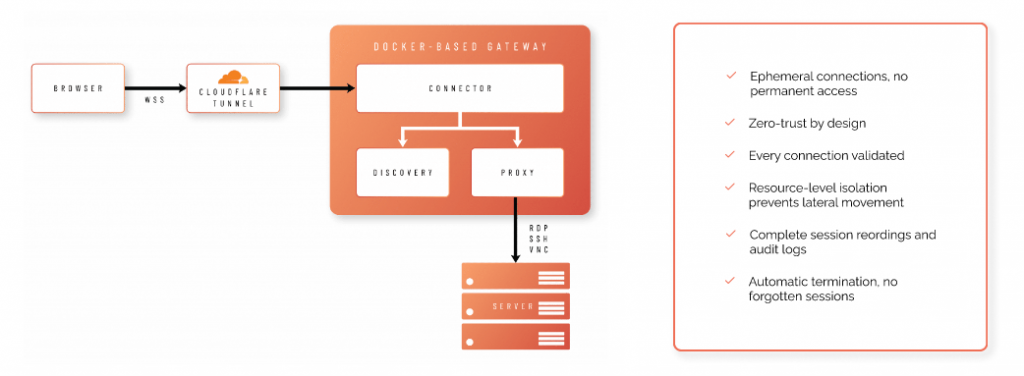
On-premises deployment using Docker within your infrastructure.
Prerequisites: Involves running Docker containers and allowing outbound connections to Cloudflare for tunnel establishment.
25 Reasons To Choose Admin By Request
Admin By Request’s Endpoint Privilege Management and Secure Remote Access combine to create a powerful suite that can boost your productivity. simplify compliance, and lock down security risks.
We’re proud to be the only solution on the market that offers all 25 of these unique benefits, even in our Free Plan.
1. Out of the Box Functionality with No Training Required
Details:
- Intuitive UI requires no end-user training for basic operations
- Deploy and enforce policies immediately with no configuration learning curve
- Free plan available with full features and 25 endpoints for instant proof-of-concept
- Training is available if needed, but most clients never request it
- Comprehensive documentation for all features
- Familiar paradigm from consumer apps, so users understand approval workflow instantly
The bottom line: Start protecting your environment immediately without scheduling training sessions, creating documentation, or waiting for users to learn complex workflows. Reduce deployment time from months to days.
2. Made by System Administrators, for System Administrators
Details:
- Founded and developed by sysadmins Lars Sneftrup Pedersen and Jacob Buus, who were fed up with the trivial, repetitive, and time-consuming work needed
- Product development driven by actual sysadmin workflows and pain points
- Features designed for practical implementation, not just compliance checkboxes
- Continuous feedback loop with IT practitioner community
- Focus on reducing administrative overhead, not creating it
- Examples include: Pre-policy reconnaissance, support assist, tray tools, real-time approvals, and more
The bottom line: The bottom line: Get a solution that solves real-world IT problems, not theoretical use cases invented in a boardroom. Built by people who understand your daily frustrations and are passionate about practical problem-solving.
3. ‘All You Can Eat’ Features
Details:
- Single SKU includes all features existing and future
- No paid modules, extensions, or feature tiers. Our product works no matter the price you pay (including free!)
- All support included
- Simple pricing: endpoint count + term duration
- No feature restrictions based on license tier
- Future features automatically included in your subscription
The bottom line: Budget once, deploy everything with no nickel-and-diming for features you discover you need later. One SKU includes all features, all future enhancements, and eliminates complex licensing negotiations.
4. Unmatched Security Record
Details:
- ZERO CVEs in the last 5 years (2020-2025
- Only 2 CVEs in the entire product history (from January 2020, both resolved in less than 24 hours)
- Millions of endpoints deployed globally
- Verifiable via public CVE database: CVE Search
The bottom line: Your privilege management solution won’t appear in your next vulnerability scan. Avoid emergency patching cycles, incident response costs, and reputational damage that happen when security tools become security liabilities.
5. Complements PAM Solutions
Details:
- Admin By Request doesn’t compete with your PAM solution, it handles a different use case
- Can audit privileged activities at endpoints PAM doesn’t see
- Secures the endpoint attack surface that PAM doesn’t address
- Both feed into unified SOC/SIEM for complete privileged access visibility
- Excels at eliminating standing local admin rights on workstations
- Enables end users to install software securely
- Developer productivity without permanent admin rights
- RPAM suite provides remote and hybrid workforce support AND privilege management
The bottom line: Your PAM solution protects the keys to the kingdom. Admin By Request protects every door in the castle: the thousands of endpoints where breaches actually start. The result is complete privileged access coverage from server to endpoint.
6. Security That Satisfies Customers and Auditors
Details:
- ISO/IEC 27001
- SOC 1, SOC 2 and SOC 3
- HIPAA/HITECH
- FedRAMP
- PCI DSS
- ISO/IEC 27018
- GDPR
- CSA Star
- ISO/IEC 22301
- ISO/IEC 27701
- NIST 800-53
- CIS Benchmarks
- HITRUST CSF
- EU Model Clauses
- IRAP
- Cyber Essentials Plus
Admin By Request is built on Microsoft Azure SQL, the most compliant and secure implementation of MS SQL Server available. More details here.
The bottom line: Deploy Admin By Request with confidence that satisfies auditors, reduces cyber insurance costs, and shrinks your attack surface, without additional vendor vetting overheads.
7. Password-Less Approach
Details:
Admin By Request does not store or handle ANY user passwords
- No AD/Entra ID passwords stored on endpoint agents
- No passwords stored in the portal
- Zero password related attack surface
- Eliminates credential theft risk at the EPM layer
The bottom line: Eliminate password related security incidents and reduce helpdesk burden. No passwords to compromise security, and no resets or password management in your EPM solution.
8. Built-in Multi-Engine Reputation Solution
Details:
- OPSWAT MetaDefender integration included at no extra cost
- Real time file reputation checking during elevation
- Aggregates threat intelligence from 37+ anti-virus vendors
- No conflicts with existing A/V or EDR solutions
- Takes less than 1 second with virtually zero system resource consumption
- Operates transparently during file elevation process
The bottom line: Get enterprise-grade malware protection at no extra cost, without conflicts with existing security tools or consuming system resources
9. Intune Compliance Integration
Details:
- ‘Intune Compliance Locking’ blocks EPM use on non-compliant devices
- Configurable for specific user/computer groups
- Real-time compliance status checking
- Non-compliant devices show PIN code instead of approval workflow
- Integrates with Intune compliance policies automatically
- Forces remediation before privileged access is restored
The bottom line: Automatically enforce security posture. Out-of-date antivirus? Missing patches? Non-compliant devices lose privilege management capabilities until remediated, closing security gaps.
10. Agent Installer Size <3MB
Details:
- Offline installer: <3MB (vs. competitors at 50-200MB+)
- Rapid deployment even on slowest networks
- Minimal attack surface: fewer files = fewer potential vulnerabilities
- No deployment bottlenecks from bandwidth constraints
- Faster time-to-protection across distributed workforce
The bottom line: Deploy thousands of endpoints in hours, not weeks, even across slow VPN connections. Minimal infrastructure and lower IT labor costs.
11. <1% Endpoint CPU Utilization
Details:
- Typical CPU unilization: <1% for average daily use
- No background scanning or continuous monitoring overhead
- Minimal memory footprint
- No performance impact on user productivity
- Stark contrast to resource-intensive competitors that impact user experience
- No system slowdowns during compiles, builds, or intensive development work
The bottom line: Deploy privilege management without degrading user experience or requiring hardware upgrades. This is especially critical for developer workstations and resource-intensive applications.
12. Cross Platform ARM CPU Support
Details:
- Native ARM CPU support on both Windows and Mac
- Supported since version 8.5 on Windows
- Full feature parity across Intel and ARM architectures
- No emulation overhead or performance penalties
- Supports growing enterprise ARM adoption (Surface Pro X, Copilot+ PCs, Apple Silicon)
The bottom line: Future-proof your EPM investment as your organization adopts ARM-based devices for improved performance and battery life. No device replacement or policy gaps.
13. Handcrafted in Denmark to Exacting Standards
Details:
- Our solutions are built entirely in-house at our headquarters in Denmark
- Single codebase architecture, not assembled from third-party components
- Direct control over quality, security, and performance optimization
- No dependency conflicts from disparate third-party modules
- Unified architecture enables features like <3MB installer size and <1% CPU utilization
The bottom line: Deploy software built with precision engineering rather than patchwork integrations. fewer compatibility issues, faster performance, and predictable behavior across your environment, because every component is designed to work together with no Frankenstein integrations or legacy code baggage from acquisitions.
14. Just In Time = Real Time
Details:
- Approval/deny notifications delivered in <1 second (sub-second response)
- Advanced IoT technology for instant push notifications
- No polling delays or user refresh requirements
- Same technology powers Break Glass account delivery
- Works even across high-latency networks
- User experience: Click approve in portal → user sees response immediately on their desktop.
The bottom line: Reduce user friction and helpdesk tickets. Approvals reach users instantly instead of requiring polling intervals or manual refresh actions.
15. Pre-Policy Reconnaissance
Details:
- Deploy with revoke feature disabled to audit existing admin usage
- Records all elevation actions from users with permanent admin rights
- User experience unchanged during reconnaissance
- Generates data to inform policy creation
- Available on both Windows and Mac agents
- Enables evidence-based policy decisions
- Run reconnaissance before implementing policies to dramatically improve deployment success rates
The bottom line: Achieve user acceptance and smooth transitions by understanding actual admin usage before removing rights. Avoid productivity disruptions and user pushback.
16. AI-Based Approval
Details:
- Intelligent automation based on 10M+ successful application elevations globally
- Vendor and application scoring from 14M+ application database
- Configurable score threshold per policy
- Only well-known, trusted applications auto-approved
- Reduces approval requests by 60-80% in typical deployments
- Continuously learning from global Admin By Request deployments
The bottom line: Automatically approve trusted applications based on global intelligence while maintaining security controls. Maintain security while reducing approval fatigue and helpdesk burden. Eliminate endless approvals for Adobe Reader, Chrome, Visual Studio, etc.
17. Time-Limited Privilege Grant
Details:
- Grant predetermined time allowance for privileged elevations
- Delivered via approval workflow or PIN code
- ‘Admin Session’ feature
- Works for both online and offline users
- Persists across reboots
- Blocking policies remain enforced during session
- OPSWAT protection still active during sessions
The bottom line: User autonomy during maintenance windows or projects without permanent privilege escalation risk with time-boxed admin rights that automatically expire.
18. Integrated Remote Privileged Access Management (RPAM)
Details:
- Secure Remote Access offers: Unattended Access, Remote Support, Vendor Access
- Same portal manages both privilege management and remote access
- Unified auditlog for all privileged activities (local and remote)
- Same policy engine controls both elevation and remote access
- Support Assist feature combines Remote Support + EPM for zero-friction helpdesk
- Session recordings available for compliance
- Secure Cloudflare tunnels (UDP port 7844, QUIC protocol)
- Same Free Plan includes remote access to 25 endpoints for a full RPAM solution proof-of-concept with no additional infrastructure required
The bottom line: Secure Remote Access and EPM work together to provide complete privileged access management from endpoint to remote session, all from one portal with unified auditing, and no outdated VPN architecture.
19. Innovative, Unlimited Policy Layering
Details:
- ‘Sub Settings’ methodology enables unlimited policy layering
- Works like firewall rules: multiple layers, hierarchical matching
- First-match-first-win logic (like ACLs)
- Settings configurable in policies
- Policies selectable/overwritable from global defaults
- Complete change log: who changed what, when, before/after values
- No limit on number of policy layers
- Endlessly scalable: start with 3 policies, grow to 30+ without configuration becoming unmanageable
The bottom line: Manage complex organizations without configuration chaos. Maintain predictable, manageable policies as your environment grows and changes.
20. In-Profile Context Switchable Policies
Details:
- Helpdesk performs instant policy context switching within user’s OS profile
- ‘Support Assist’ feature on Windows and Mac agents
- All support-invoked elevations fully audited by EPM
- No need to disable/bypass EPM for support activities
- Maintains complete audit trail of all privileged actions
- Different policies apply automatically when support is assisting
- Eliminates the common practice of “turn off EPM to fix user issue.”
The bottom line: Enable true Zero Trust for IT support so helpdesk can assist users without bypassing security controls or creating unaudited privilege escalation gaps.
21. UAC Mode Selection
Admin By Request offers three UAC handling modes
Details:
- Native mode: Driverless, uses standard Windows UAC / Mac authentication
- User consent mode: Simple interactive yes/no confirmation required
- MFA mode: SAML 2 compliant MFA authentication required for elevations
- Configurable per user/computer group
- Different modes for different risk profiles
- No driver requirements for native mode
- Flexible security posture options
The bottom line: Match security controls to risk tolerance and user sophistication. From seamless experience to MFA-protected elevations based on user role.
22. User>Hardware Fusing
Details:
- ‘Device Owner’ feature automatically fuses users to their hardware
- One-button pairing/unpairing in portal by administrators
- ‘Owner Blocking’ prevents non-owners from using EPM on device
- Non-owners presented with PIN code instead of approval workflow
- Automatic pairing on agent deployment
- Simplifies device lifecycle management
- User’s laptop is stolen → thief cannot elevate privileges because they’re not the fused owner
The bottom line: Prevent unauthorized device usage and simplify BYOD management. Ensure only designated users can perform privileged actions on specific hardware.
23. Non-Privileged Account Separation
Details:
- Force users to authenticate with separate non-privileged account for EPM use
- ‘Account Separation’ feature (introduced version 8.5)
- User logs in with standard account → uses different account for elevations
- Configurable per user/computer group
- Meets Cyber Essentials Plus requirements
- No need for dual-login infrastructure
The bottom line: Meet strict compliance requirements (UK Cyber Essentials Plus, NIST) that mandate separate accounts for privileged actions, without complex infrastructure changes.
24. Network Location Whitelisting
Details:
- Create read-only network shares as ‘safe repositories’
- ‘Run As Admin location pre-approval’ for entire folder trees
- Users can elevate ANY file from approved locations
- No per-application whitelisting required
- Centralized software distribution without approval workflow overhead
- Available since first version of Admin By Request
- Eliminates the common practice of “turn off EPM to fix user issue.”
- IT maintains \\server\approved-software share → all users can install from there without approval requests.
The bottom line: Simplify software distribution and eliminate approval bottlenecks for trusted applications. Users can self-service from approved repositories without tickets.
25. Policy-Based Shortcut Tooling
Details:
- ‘Tray Tools’ feature in Admin By Request tray icon
- Launch applications (elevated or non-elevated) from menu
- Launch URLs from tray menu
- Different tool sets per user/computer group
- Tools dynamically change based on Support Assist mode
- Configurable in portal, deployed automatically
The bottom line: Reduce helpdesk load and improve user experience. Users access approved tools directly without searching or requesting approval.
Enterprise-Grade RPAM Without Enterprise-Grade Complexity or Cost Overruns
Admin By Request EPM is the only solution currently available that includes ALL of these features and functionalities, even in its FREE PLAN.
Handcrafted in Denmark By System Administrators for System Administrators
VPN vs Cloudflare Tunnelling
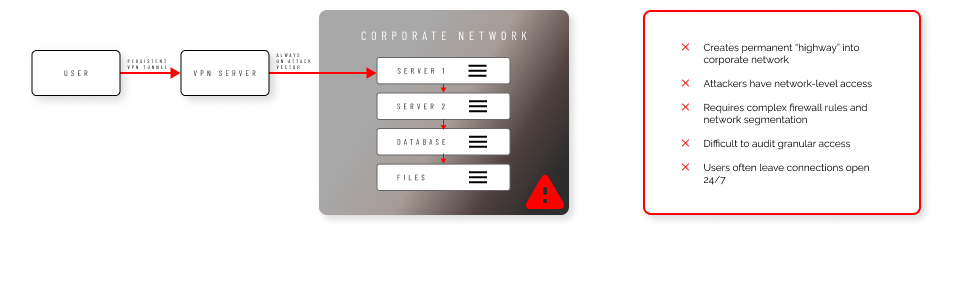
VPN Vulnerabilities
Cloud Tunnelling Strengths
FAQs
What is Secure Remote Access and how does it work without VPNs?
Secure Remote Access is a Zero Trust, browser-based remote access solution that provides just-in-time connections to internal systems without requiring persistent VPN tunnels. Instead of always-on connections, our solution uses secure WebSocket sessions through Cloudflare tunnels or self-hosted gateways. When access is needed, users request permission through the portal, and once approved, they connect directly through their web browser. Sessions are automatically terminated when complete, eliminating standing access points that attackers could exploit.
What are the three components of Admin By Request's Secure Remote Access solution?
Our Secure Remote Access solution includes three distinct components:
- Unattended Access provides protocol-level remote access (RDP, SSH, VNC) to endpoints without requiring a user to be present at the target device.
- Vendor Access allows external third parties to securely access internal systems through their web browsers via access.work, with scope-limited permissions.
- Remote Support enables live screen-sharing and control sessions between IT administrators and end users for helpdesk scenarios.
All three components work through the same centralized management portal.
How does Secure Remote Access handle vendor and contractor access securely?
External vendors and contractors access systems through our Vendor Access component via access.work, requiring no software installation on their devices. They authenticate securely and can only access systems within their approved scope. Every vendor interaction is fully logged and auditable, eliminating the need to create internal accounts for vendors or expose systems through traditional VPN access.
Can Secure Remote Access work for both cloud-hosted and on-premises deployments?
Yes, our solution supports both deployment models. The cloud-hosted option requires no additional infrastructure and can be deployed immediately using our managed service. For organizations preferring on-premises control, we offer a Docker-based gateway that includes Connector, Proxy, and Discovery components. The on-premises option also supports device discovery of unmanaged endpoints and reverse proxy routing.
What protocols does Secure Remote Access support and how are sessions secured?
Secure Remote Access supports RDP for Windows systems, SSH for Linux and Mac, and VNC for cross-platform screen sharing. All sessions use encrypted WebSocket connections and can be configured with multi-factor authentication. Optional video session recording captures complete screen activity for compliance review. Sessions include automatic expiry timers and inactivity timeouts to prevent forgotten connections.
How does the approval workflow function for remote access requests?
Remote access requests follow customizable approval workflows through the Admin By Request portal. When a user requests access, designated administrators receive notifications and can approve or deny requests through the web portal or mobile app. The system supports role-based access control, allowing different approval requirements based on user roles, target systems, or access types. For routine access patterns, administrators can configure automated approvals with specific conditions.
How does session recording and audit logging work in Secure Remote Access?
Every remote access session generates comprehensive audit logs including user identity, target system, session duration, protocols used, and approval trail. Optional video session recording captures complete screen activity during Remote Support sessions. Session metadata includes contextual information like user roles and approval workflows. All data can be exported for SIEM integration or compliance reporting.
Can Secure Remote Access integrate with existing authentication and identity management systems?
Yes, our solution integrates with Azure AD, SAML providers, and Office365 for single sign-on authentication. This allows users to authenticate with their existing corporate credentials rather than managing separate accounts. SSO integration also enables conditional access policies and centralized user management. The system supports multi-factor authentication requirements and can enforce additional verification steps before initiating remote sessions.
What are the main differences between traditional RDP deployments and Admin By Request's Secure Remote Access?
Traditional RDP deployments typically require direct network connections, open firewall ports, and persistent VPN tunnels that create security risks. While our Secure Remote Access still uses RDP as a protocol for Windows connections, we eliminate these vulnerabilities by brokering sessions through secure tunnels with outbound-only connections. Browser-based access eliminates RDP client software requirements, and unlike traditional RDP’s static credentials, every connection requires explicit approval rather than assumed access.
All Core Features, 25 Seats, Completely Free
Your free plan includes 25 licenses for our Endpoint Privilege Management and Secure Remote Access products, so you can see just how easy it is to lock down endpoints, manage security, and support your workforce wherever they are.